Festi Harness: The AI Agent Harness That Runs Agent Mode
Let AI agents operate your platform, with your permissions, your approvals and a full record of every step.
Festi Harness is the AI agent harness of the Festi Agentic AI Platform. It runs Agent Mode, the assistant inside the platform that does real work for a signed in user: it reads data, starts jobs, hands tasks to other agents and reports back. The harness turns one message into a governed run, drives the language model and a curated set of tools, asks a person before anything risky happens and streams what it does to the browser.
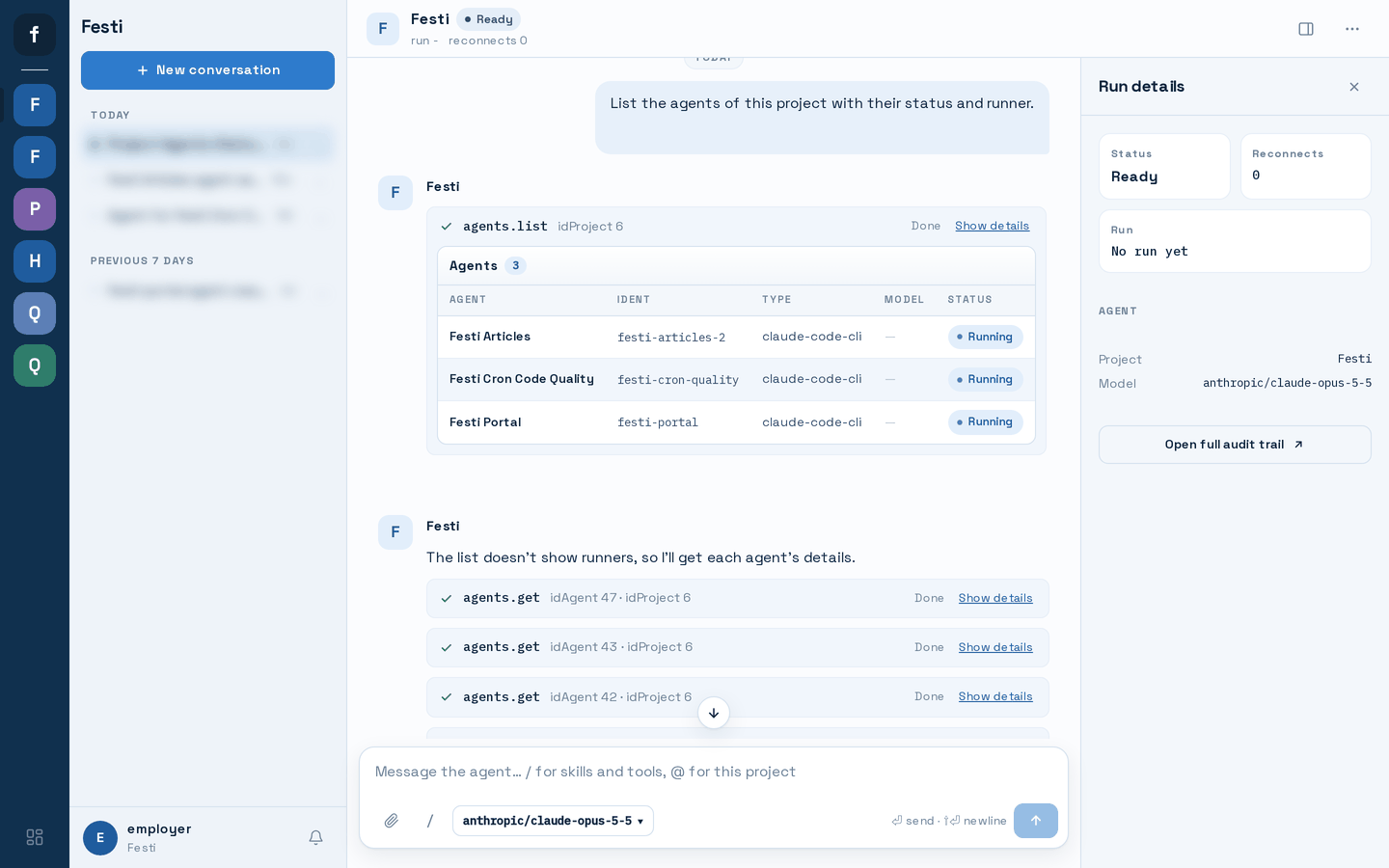
Why You Need an AI Agent Harness, Not Just a Chat Window
A chat bot that can call tools is easy to demo and hard to trust. Once an assistant can change records, start pipelines or message other systems, every question an engineering lead asks is about control:
- Which tools can it use, and in which project?
- Does it act with its own rights or with the rights of the person who asked?
- What happens when a tool returns text that looks like an instruction?
- Who approves a delete, a payment or a message to an outside service?
- What did it do, step by step, and what did it cost?
An AI agent harness answers those questions in code, not in a prompt. Festi Harness wraps every model turn and every tool call in rules that the model cannot talk its way around, so your team can let an agent operate internal tools without handing it the keys.
What the Festi AI Agent Harness Does

A run sees only the tools that pass the harness rules. A platform tool must declare that it is meant for Agent Mode, carry a known risk level and have an input schema the harness can check. A project can narrow the list further with an allowed list of its own. Generic platform methods that would let a model reach anything are refused by name.

Every tool call is made as the signed in user, in the project of the conversation, with a short lived delegation token that the host application signs. If the user cannot do something, the agent cannot do it either. A call that names a different project is refused before it leaves the harness.

Each tool has a risk level, from read only through writes and deletes to external communication, financial and admin actions. A project decides what a person is asked about. Without a policy, a read runs on its own and every other risk level asks a person. A tool can also declare its own rule. A risky call stops the run and shows an approval card. The run continues only after someone approves it, and an approval answered in another browser tab is picked up too.

Text that comes back from a tool, or from another agent, is fenced between marked boundaries before the model reads it. The closing marker carries a one time value, so a tool result cannot fake the end of the fence. An instruction hidden in a web page, a record or an agent answer stays data, and the model never follows it. Long results are cut for the model, and the full result is kept as an artifact.

When a tool refuses a call, for example because the user lacks permission or the input is invalid, the harness stores the reason and gives it to the model. A refused call is never repeated automatically, and the agent tells the user what was refused instead of looking for a way around it.

A platform tool can mark an argument as secret. The real value goes to the tool call and nowhere else: the stored tool call, the approval card, the conversation and the live stream all show a mask instead.
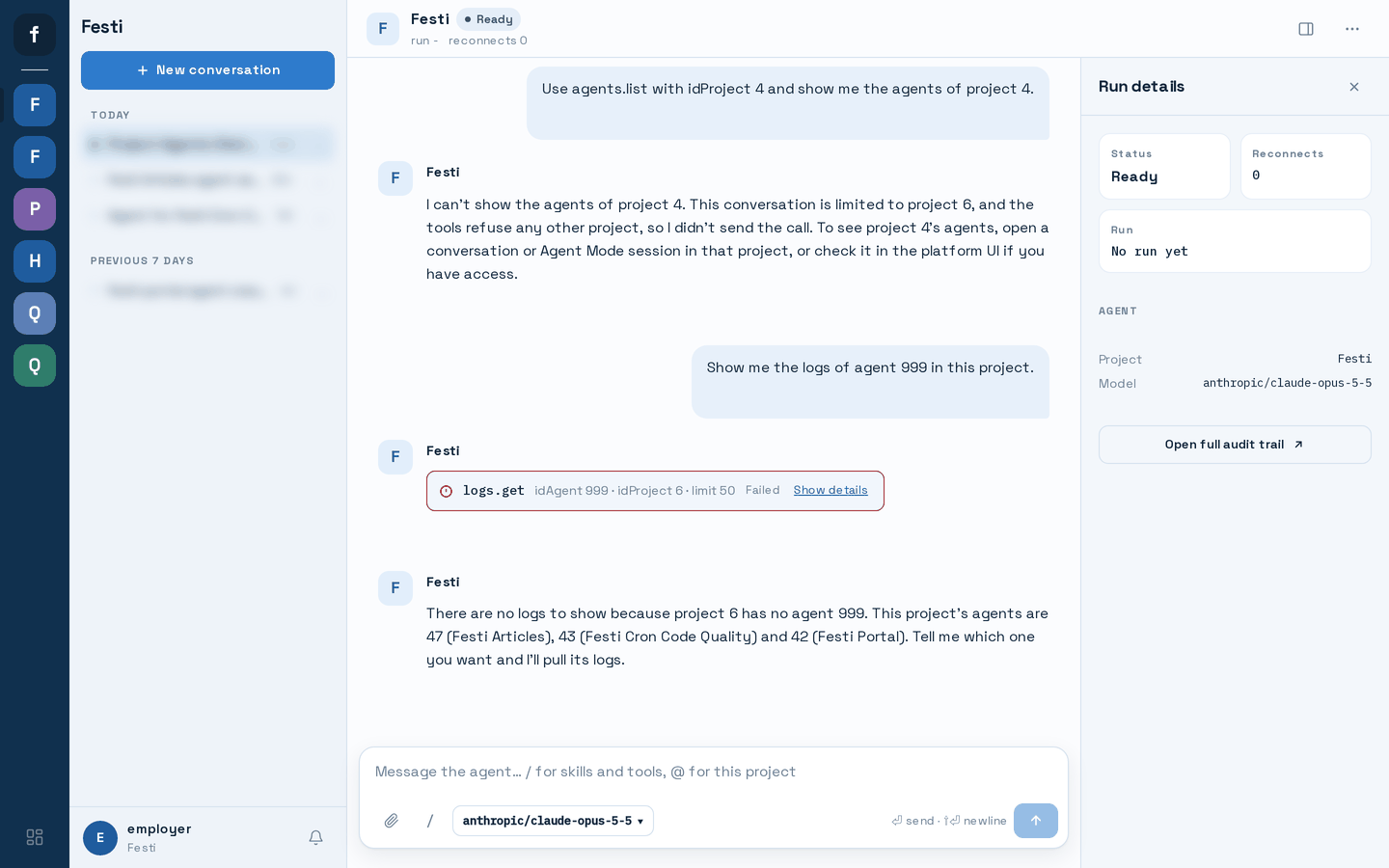
Shows Results Instead of Repeating Them
Tool results can render as tables on screen, so the assistant does not have to repeat a list of records in its own words. The user sees the data, and the answer stays short.
AI Agent Harness Guardrails You Can Measure
Every run has limits, and the host can tune them per project. The defaults:
| Guardrail | Default per run |
|---|---|
| Model turns | 25 |
| Tool calls | 50 |
| Run time | 30 minutes |
| Tokens | 400,000 |
| Cost | 2.00 per run and 25.00 per project per day, when a model price list is configured |
| Identical tool calls in a row | 3, then the loop detector stops the run |
When a run reaches a limit it stops and says so in the conversation, rather than running up a bill in the background.
Multi Agent Work and Background Jobs in One Conversation
Real operations work rarely finishes in one reply. Agent Mode can hand a task to another agent on the platform, wait for it, read its answer and relay the questions that agent asks back to the user.
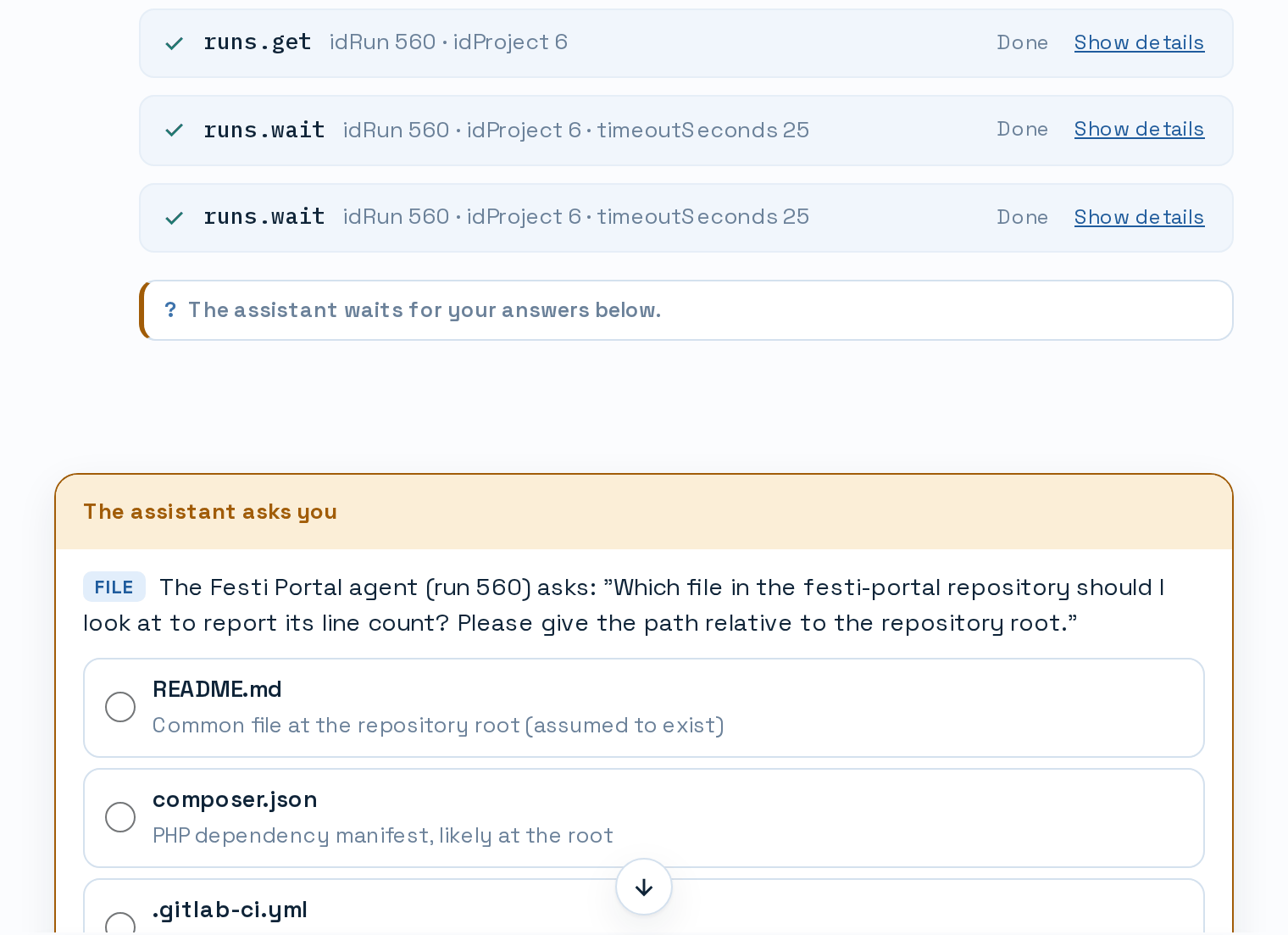
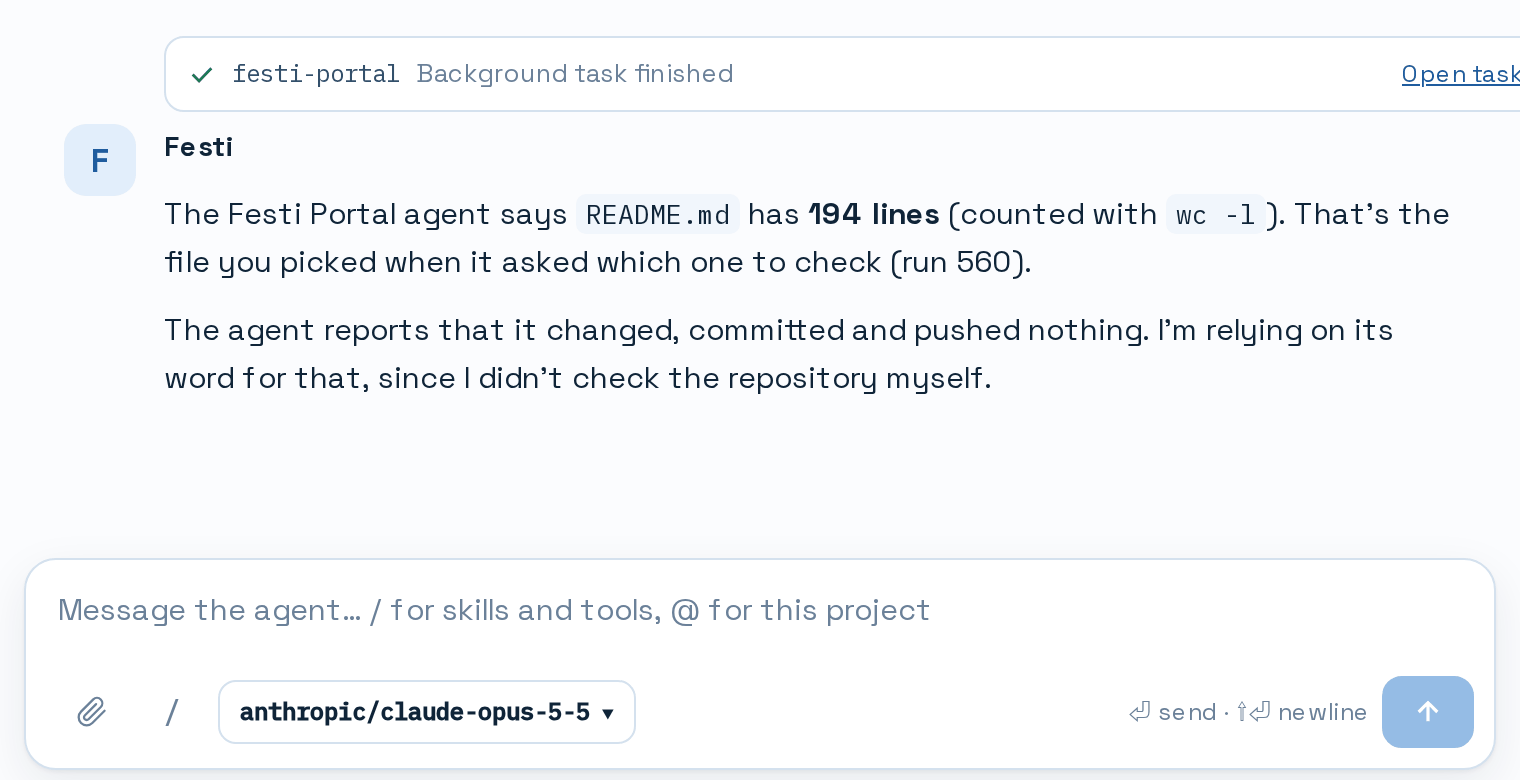
A tool can also start work in the background, such as a data pipeline or a long running agent task. When that work ends, the result comes back into the same conversation. If no run is active at that moment, the AI agent harness starts one to read the result and explain it, including what went wrong and what would fix it when the work failed.
How the AI Agent Harness Works
Festi Harness runs next to the host web application as three small processes, with the database as the single record of everything that happens.
- A message becomes a run. The user writes in Agent Mode. The host application queues a run and seals a delegation token for it.
- A supervisor starts one worker per run. The supervisor claims queued runs and starts a separate worker process for each one, so a fault in one run cannot stop another.
- The worker drives the model and the tools. It calls the model, checks each tool call against the rules above, asks for approval where the policy requires it, calls the tool over MCP and stores every step before it publishes it.
- The browser follows live. An event gateway streams each step to the browser over Server Sent Events. A browser that reconnects gets the stored events first and then the live ones, so nothing is lost.
- Recovery is built in. Workers renew a lease while they run. If a worker dies, the supervisor takes the run over and tries again a limited number of times, and runs that nothing carries any more are ended with a clear reason.
An Agent Runtime That Works With Your Models and MCP Tools
Anthropic, OpenAI and Gemini protocols, plus model servers of your own that speak one of them, including a model server on your local network. The model library sits behind one interface, so changing a provider never touches the run logic.
The worker is an MCP client. It calls the platform's own MCP endpoint, and each project can register outside MCP servers. A registered server gets its own credential, never the user's delegation token, and every call to it needs an approval.
Threads, messages, runs, steps, tool calls, approvals, notices and events are stored in MySQL or MariaDB tables. Each run records its cost.
A PHP 8.2+ package that a Festi host application installs, with MySQL 8.0+ or MariaDB 10.11+, RabbitMQ for live events and Swoole for the event gateway.
Festi Harness builds on the same foundations as the rest of Festi, including Web API Services and Asynchronous PHP Services and Daemons.
Who the AI Agent Harness Is For
You want AI agents to take routine operations off your team without creating a new risk surface. The harness gives you permissions, approvals, budgets and an audit trail that you can explain to security and to the business.
You run the internal tools and the dev platform. Agent Mode lets people start pipelines, check jobs and query data in plain language, while every call still passes through the same permissions and project boundaries as the user interface.
Festi Harness ships as part of the Festi Agentic AI Platform. Your platform publishes tools over MCP with a risk level and an audience, and the harness takes care of the run, the approvals, the stream and the recovery.
AI Agent Harness Use Cases
- Operate the data platform by chat: "Run the evaluation pipeline on last week's dataset and tell me when it is done." The job runs in the background and reports back into the conversation.
- Coordinate agents: ask Agent Mode to hand a research or coding task to a specialised agent, then answer that agent's questions without leaving the thread.
- Answer questions from live data: list records, compare runs or check job status, with the result shown as a table.
- Controlled changes: let the assistant prepare a change and approve it on a card before it is made.
The Festi Coder Model and the AI Assistants and Automation Tools cover the model and assistant side of the same platform. For a platform built and run this way, read the Harvesting Data Platform case study.
AI Agent Harness FAQ
Put Your AI Agents on a Harness
Festi Harness is part of the Festi Agentic AI Platform, which is in early access. Tell us which internal tools you want an agent to operate, and we will show you Agent Mode working on them with your permissions and approvals in place.