What Changed and Why
Festi CLI is the tool you use before anything else exists: it installs a project, applies its migrations, generates plugins and DGS definitions, and scaffolds React apps. That makes its rough edges expensive, because you hit them on day one of a project rather than in week ten.
Problem
The nine commands were effectively undocumented at the point of use. There was no --help, so the way to find out what a command took was to run it and watch what happened, which meant answering prompts you did not mean to start, or reading a "could not find config" error that told you nothing about the command.
Migration files were hand-numbered, so two branches would both write updates13.sql and one would silently lose. Database passwords were pasted into a shell command, readable by any local user through the process list and printed in the error when a connection failed. And the migration clients ignored the host in the project's connection string, so a command aimed at a remote database quietly tried a local socket instead, or backed up one server while migrating another.
Solution
7.1.0 treats the command line as a product surface. Every command answers --help before it loads anything, and the multi-mode commands narrow their help to a single mode on request. festi-make-migration takes the numbering decision away from the developer entirely by using a timestamp, and reserves each number across both file types. Passwords move to the child process environment on all three databases. Host and port are read from the project's own connection string, with the override flags applying only when you pass them.
Feature Highlights
Help on every command
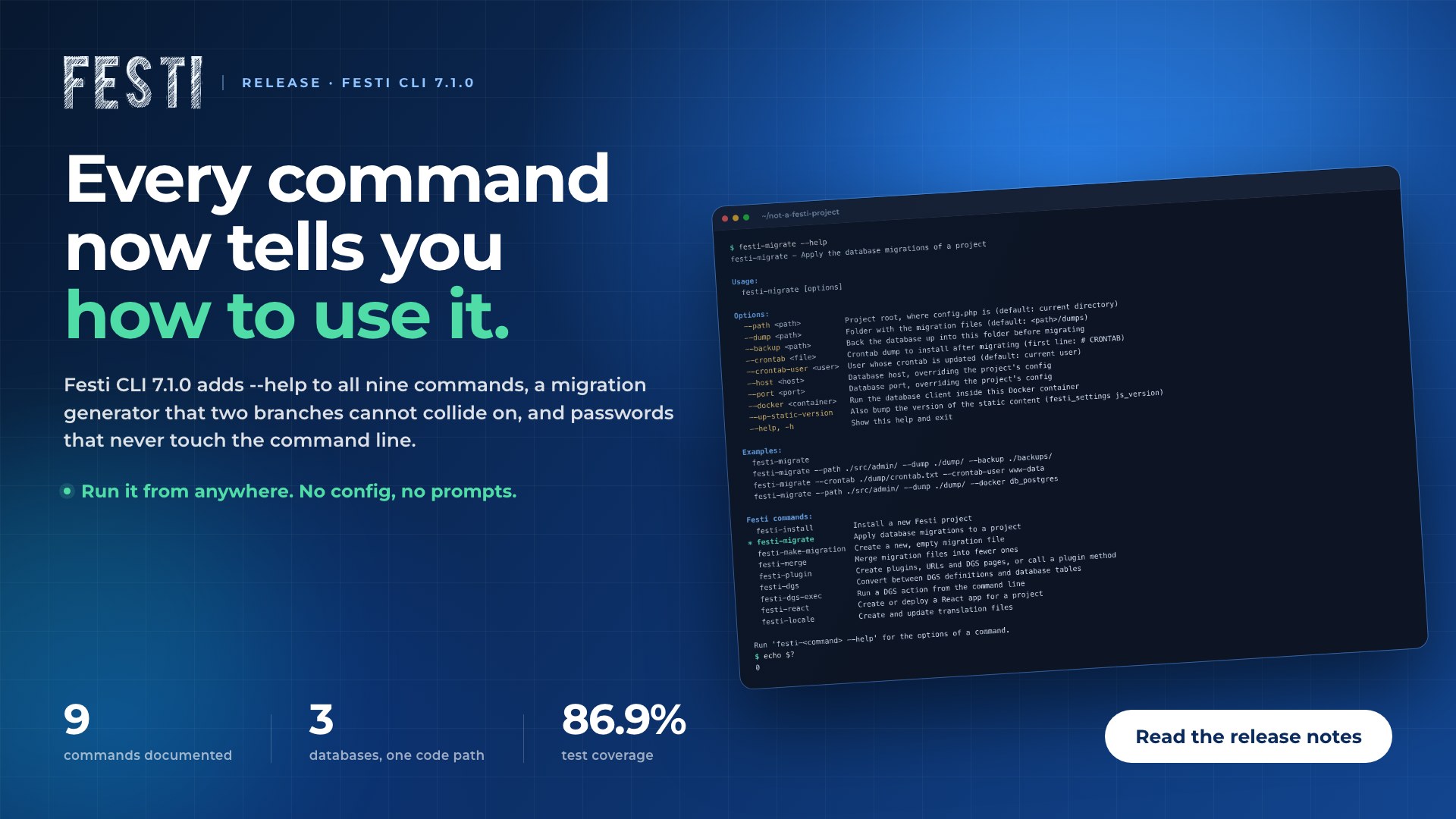
All nine commands answer --help and -h with usage, options, examples and the full list of Festi commands, the current one marked. Help is answered before any prompt, config load or database connection, so it works from any directory and exits cleanly. Here it is run from a directory that is not a Festi project at all:
$ festi-migrate --help
festi-migrate - Apply the database migrations of a project

Usage:
  festi-migrate [options]

Options:
  --path <path>          Project root, where config.php is (default: current directory)
  --dump <path>          Folder with the migration files (default: <path>/dumps)
  --backup <path>        Back the database up into this folder before migrating
  --crontab <file>       Crontab dump to install after migrating (first line: # CRONTAB)
  --crontab-user <user>  User whose crontab is updated (default: current user)
  --host <host>          Database host, overriding the project's config
  --port <port>          Database port, overriding the project's config
  --docker <container>   Run the database client inside this Docker container
  --up-static-version    Also bump the version of the static content (festi_settings js_version)
  --help, -h             Show this help and exit

Examples:
  festi-migrate
  festi-migrate --path ./src/admin/ --dump ./dump/ --backup ./backups/
  festi-migrate --crontab ./dump/crontab.txt --crontab-user www-data
  festi-migrate --path ./src/admin/ --dump ./dump/ --docker db_postgres

Festi commands:
  festi-install         Install a new Festi project
* festi-migrate         Apply database migrations to a project
  festi-make-migration  Create a new, empty migration file
  festi-merge           Merge migration files into fewer ones
  festi-plugin          Create plugins, URLs and DGS pages, or call a plugin method
  festi-dgs             Convert between DGS definitions and database tables
  festi-dgs-exec        Run a DGS action from the command line
  festi-react           Create or deploy a React app for a project
  festi-locale          Create and update translation files

Run 'festi-<command> --help' for the options of a command.
$ echo $?
0
Per-mode help
The multi-mode commands take --help --mode <mode> and narrow the page to that mode's options. An unrecognised mode prints the full page plus the list of modes that do exist, rather than failing silently.
Collision-free migrations
festi-make-migration writes an empty updates<unix timestamp>.sql, or a ready-made migration class with --php. Because the number comes from the clock and is reserved across both extensions, two developers on two branches cannot produce the same filename. Run back to back within the same second, the two calls still take different numbers:
$ festi-make-migration --path ./src/site/ --dump ./dumps
Migration file created: ./dumps/updates1790765664.sql    [ OK ]
DONE    [ OK ]
$ festi-make-migration --path ./src/site/ --dump ./dumps --php
Migration file created: ./dumps/updates1790765665.php    [ OK ]
DONE    [ OK ]
$ ls dumps
updates1790765664.sql   updates1790765665.php
The --php form is not an empty file. It writes a migration class wired to the transaction, ready for you to fill in:
<?php

use core\util\MigrationUpdates;

class Updates1790765665 extends MigrationUpdates
{
    protected function onStart(): void
    {
        $core = Core::getInstance();

        $core->db->begin();

        try {
            // Write the migration here.

            $core->db->commit();
        } catch (Exception $exp) {
            $core->db->rollback();

            throw $exp;
        }
    }
}
Passwords out of the command line
Database passwords travel to the MySQL, PostgreSQL and SQL Server clients through the child process environment. They no longer appear in the process list, in error output, or as shell syntax that a shell might act on.
The right database server
Host and port are read from the project's connection string on MySQL, PostgreSQL and SQL Server. --host and --port override them only when supplied, so a run without them targets the configured server rather than resetting it to localhost.
Docker images that build
The installer offers PHP 8.4 and 8.3 and matches the swoole version to it. All three Apache templates build, the SQL Server templates install their driver and build, and the containers run as www-data with the host UID and GID, so files a container writes into a bind-mounted project stay yours.
A React scaffold that starts
Generated React apps pin real version ranges instead of latest. A scaffold created today builds and starts instead of failing on a transitive dependency that moved under it.
DGS conversion that survives real schemas
The converter keeps enum values, resolves SQL Server foreign keys to the referenced table, accepts datetime fields with no explicit format, and creates a table and its foreign keys in a single transaction.
Benefits & Impact
Less guessing on day one
The command line answers its own questions. A developer meeting a Festi project for the first time can discover what every command takes without running anything that has side effects.
No more lost migrations
Timestamp-based names remove a class of merge accident that produced no conflict and no error: two branches, one filename, one migration silently never applied.
Credentials that stay credentials
A password in a process list is readable by every local user on the machine. Moving all three database clients to environment variables closes that, and the shell-syntax handling closes a second problem alongside it.
Deploys that target what you meant
Reading host and port from the project's own connection string means a migration or a backup goes to the server the project is configured for, rather than to whatever happens to be listening locally.
A safer base to change
Coverage is 86.9% through scenario tests, the quality gate is green, and continuous integration exercises MySQL, PostgreSQL and SQL Server separately against isolated databases. Changes to the CLI are now caught by tests that describe what a developer does, not just which lines ran.
Conclusion
Festi CLI 7.1.0 is a release about the parts of a framework you touch before you have written anything: the installer, the migrations, the Docker templates and the commands themselves. None of it is glamorous, and all of it is what a developer meets in the first hour.
If you already run Festi, upgrade and try festi-migrate --help from anywhere. If you are starting a project, festi-install will now put its directories where you expect and hand you containers that build. Want to talk through a Festi project? Get in touch with the team.